NWS Weather Report
Weather Report LLCWeather
4.459.00 Reviews
- Version
- 8.2.0
- Installs
- 10.00K
- Age Rating
- Everyone
Screenshots
Our Review of NWS Weather Report
 Analysis by Appyee
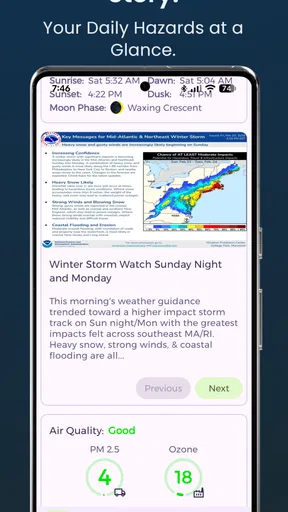
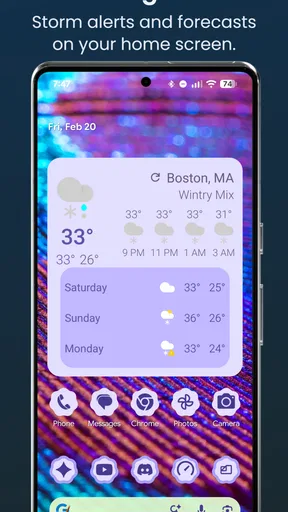
I tend to judge a weather app by what happens when I need an answer quickly, not by how impressive its forecast screen looks on a calm afternoon. NWS Weather Report takes a practical route: it combines live radar, forecasts, and severe-weather alerts connected with NOAA information in one free weather app. After using it as a day-to-day check rather than treating it like a full meteorological workstation, I found it most useful for making quick decisions about travel, errands, outdoor plans, and changing conditions.
The app comes from Weather Report LLC and is aimed at anyone who wants a straightforward view of what the weather is doing now and what may happen next. Its audience is broad, reflected in an Everyone content rating, but the most convincing reason to try it is the focus on radar and severe-weather awareness. The app has a 4.4 average from around 164 ratings, with more than 10 thousand installs, so it has a modest but visible user base rather than the reach of the biggest household-name weather services.
It is free to install, which makes testing it low-risk. There are optional in-app purchases ranging from $1.99 to $59.99 per item, so I would still check the purchase screen carefully before assuming every part of the experience is included at no cost. The current release is version 8.2.0, and the app requires Android 10 or newer. That last point matters if you use an older phone, because compatibility is determined before you can judge the app’s speed or usefulness.
How quickly it answers the questions I actually ask
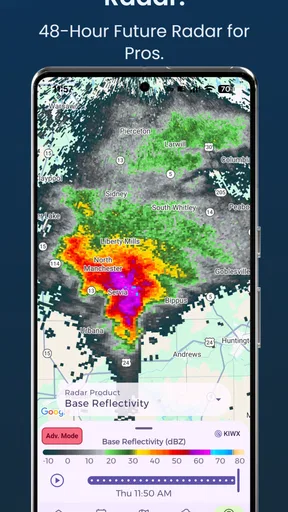
My first impression of a weather app usually comes from three questions: Is it going to rain soon, how severe is the change, and should I alter my plans? NWS Weather Report is well suited to that sequence because radar gives the present situation more context than a row of hourly symbols alone. A forecast can tell me that rain is expected, while radar helps me understand whether the rain is already approaching, passing nearby, or remaining scattered.
That distinction makes the app feel more useful during short decision windows. Before leaving for work, I can look at the current radar picture and then check the forecast rather than relying on a single temperature number. Before a walk or a drive, I can use the same process to decide whether a delay is sensible. The app’s value is therefore less about browsing weather for entertainment and more about reducing uncertainty when conditions are changing.
I would not promise that every screen will feel instant on every phone or network. Radar and forecast information depend on data arriving from outside the device, so connection quality naturally affects the experience. Still, the structure of the app encourages a quick check instead of making me dig through unrelated sections. That is an important speed advantage over weather services overloaded with news, lifestyle content, advertising, or elaborate customization panels.
There is also a useful mental shortcut here: use radar for the immediate present and the forecast for planning beyond the next short stretch. Treating either one as a complete answer can lead to poor decisions. A radar image is not a guarantee that a particular street will stay dry, and a forecast icon cannot show the movement of a storm cell. Combining both views is one of the more practical habits the app supports.
Radar is most valuable when the forecast feels too general
The live radar is the feature I would put at the center of the experience. A standard weather app often gives me a clean forecast but leaves me guessing about the shape and movement of nearby precipitation. Here, the radar view can add the missing spatial context. That is especially helpful when I am deciding whether to leave now, wait briefly, or take a different route.
A non-obvious advantage is that radar can prevent overreacting to a single forecast label. “Rain” might mean a brief shower far away or a broad band moving toward the area. Looking at the map before changing plans helps me distinguish those situations. Conversely, a forecast that appears manageable can deserve more attention if the radar shows a large, fast-moving system nearby. I would use the two views together rather than letting one replace the other.
For a family outing, my workflow would be simple: check the near-term forecast, open radar, look for movement toward the destination, and then review any severe-weather alert. That takes less effort than comparing several unrelated weather sources. It also gives a more grounded answer than asking only whether the current temperature is comfortable.
Severe-weather alerts change the app’s role
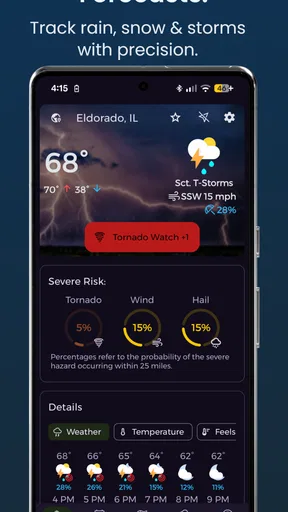
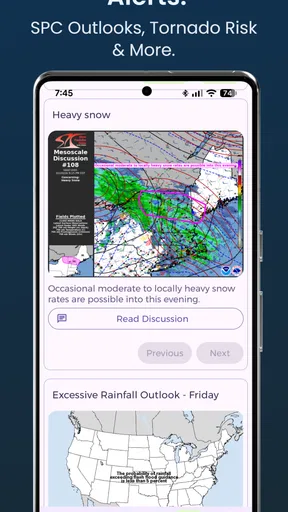
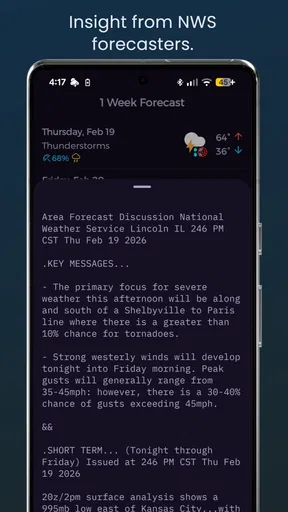
Many weather apps are used mainly for temperature and rain timing. The NOAA severe-weather alerts make this app more relevant when the stakes are higher. An alert is not a substitute for local instructions or personal judgment, but it can bring important information into the same place as the ordinary forecast. That makes the app more than a casual “should I bring a jacket?” tool.
I would pay particular attention to how alerts fit into my own routine. If I live in an area where weather can change rapidly, checking the alert area and timing should become part of the normal weather check, especially before driving or arranging outdoor activities. If I receive an alert, I would read its details instead of relying only on a notification headline. The useful action is understanding what is happening, where it applies, and whether my plans put me in its path.
The trade-off is that an alert-focused weather app can feel more serious than a minimalist temperature widget. Someone who wants nothing beyond a glance at today’s high and low may find the radar and warning emphasis unnecessary. For me, that extra context is worthwhile when conditions are unsettled, but it is not the reason I would open the app on every quiet morning.
What happens during heavier use and changing conditions
Weather apps are easy to judge when the sky is clear. The more revealing test is a day with repeated checks: leaving home, watching clouds build, checking the radar again, and then reviewing an alert. NWS Weather Report makes sense for that pattern because its main purpose is not confined to a single daily forecast. Its radar and warning information give me a reason to return when conditions evolve.
Repeated checking can also expose friction. A weather app that depends on current information is naturally more sensitive to poor connectivity than a basic offline display. If a screen takes longer to refresh, I would avoid making a last-second safety decision from an incomplete view. I would wait for the information to load or use another trusted source when circumstances are urgent. That is not a criticism unique to this app; it is a sensible limitation of any live weather service.
One practical tip is to check before the pressure of a decision arrives. If I know I have a long drive later, I would review the forecast and radar earlier rather than waiting until I am already on the road. That gives me time to notice a developing pattern and consider alternatives. It also reduces the temptation to interpret a single frame or notification too hastily.
Another useful habit is comparing the radar picture with the forecast window instead of staring at the map continuously. Radar is most helpful when it answers a question. Is precipitation moving toward me? Is it clearing? Is the active area close to the route? Looking with that purpose keeps the app from becoming a source of unnecessary worry and makes the information easier to act on.
A realistic everyday scenario
Imagine I am planning an afternoon appointment across town. The hourly forecast suggests unsettled weather, but that description alone does not tell me whether I should leave early. I open the app, check the radar for the route area, and then look for severe-weather alerts from NOAA. If the precipitation is moving away, I may keep the original plan. If a stronger system is approaching, I can leave earlier, postpone the trip, or choose indoor alternatives.
On the return journey, I would check again rather than assuming the earlier view still applies. That second check is where a live radar tool earns its place. The weather at departure and the weather an hour later may not match, and a static morning forecast can feel too broad for that kind of decision.
For outdoor exercise, the same workflow is useful but with a different priority. I would look at the immediate radar pattern first, then the forecast for the full activity period, and finally any warning that could affect safety. The app does not remove the need for common sense, but it can make the decision more informed than checking a temperature alone.
Stability and recovery deserve realistic expectations
I see NWS Weather Report as a tool that should be opened, consulted, and closed, not necessarily left running all day. That approach is likely to be kinder to a phone’s battery and keeps the app’s role focused. Since live radar and alerts require current information, I would expect the most demanding moments to be loading or refreshing those views rather than reading a simple forecast.
I would also avoid judging reliability from one slow refresh. Network conditions, location, and the service supplying current weather information can all influence how quickly a screen becomes useful. If the app does not immediately show the information I need, my recovery routine would be to check the connection, retry once, and avoid treating an unfinished display as a clear forecast. For urgent severe-weather decisions, I would cross-check with official local guidance rather than depending on one app alone.
This is where the app’s NOAA alert focus helps conceptually: it directs attention toward information with practical consequences. But alerts should still be read carefully. A notification is a prompt to investigate, not a complete explanation of the situation. Users who want a weather app to make decisions for them may be disappointed; users willing to interpret radar, forecasts, and warnings should get more value from it.
Device limits, cost choices, and who should use it
The Android requirement is clear: the app needs Android 10 or later. On a supported phone, the main device considerations are likely to be screen size, connection quality, and how much time I spend viewing radar. A larger display can make map-based weather easier to interpret, while a small or older device may make detailed movement patterns less comfortable to follow. I would not choose a phone solely for this app, but the hardware does affect how pleasant radar use feels.
Because the app is free to install, I would recommend trying it during ordinary weather before relying on it during a major storm. That gives me time to learn where the radar, forecasts, and alerts appear and to decide whether the presentation makes sense at a glance. It is better to discover a preference or workflow issue on a calm day than during a stressful warning.
The optional purchase range also creates a decision point. A free weather app can be perfectly adequate for occasional checks, while someone who uses radar and alerts constantly may consider paid options if they offer a smoother or more suitable experience. I would not pay simply because a feature exists behind a purchase prompt. I would first ask whether it changes my daily decisions, reduces friction, or provides information I genuinely use.
This app is a good fit for people who want radar and severe-weather awareness without moving to a desktop-style weather dashboard. It should appeal to commuters, parents planning outdoor activities, walkers, drivers, and anyone living where conditions can shift quickly. It is less compelling for someone who only wants a tiny temperature display, a decorative home-screen widget, or a broad collection of lifestyle forecasts.
I would also suggest caution for users who need specialized information for professional work. Aviation, marine, emergency-response, and other high-consequence activities may require dedicated sources and procedures beyond a general weather app. NWS Weather Report can be a convenient everyday layer, but it should not replace the official channels and specialized tools those situations demand.
How it compares with familiar weather alternatives
Compared with a basic built-in phone weather service, this app’s strongest distinction is the emphasis on live radar and NOAA severe-weather alerts. A default weather screen may be faster for checking the current temperature because it is already integrated into the device, but it can be less useful when I need to understand what is moving nearby. NWS Weather Report earns its space when the question is about changing conditions rather than a single number.
Compared with large commercial weather platforms, the appeal is focus. Many established alternatives combine forecasts with maps, news, videos, pollen information, lifestyle content, and extensive personalization. That can be valuable, but it can also make the simple task of checking an approaching shower feel crowded. This app’s narrower weather purpose is easier to appreciate when I want a direct answer.
The reverse trade-off is breadth. If I regularly need many specialized layers, deep historical tools, or a highly customized dashboard, a larger service may suit me better. I would choose NWS Weather Report for practical radar and alert awareness, not because it must replace every weather resource on my phone.
Its moderate install base also suggests a more focused product experience than the dominant weather brands, though popularity alone should not determine the choice. What matters is whether the app’s radar view, forecast presentation, and warning workflow match the way I make decisions. The best test is to use it for a week that includes both routine mornings and at least one changeable-weather day.
My performance verdict after using it as a daily weather tool
NWS Weather Report feels most convincing when I need context quickly: what is happening now, what may happen next, and whether a severe-weather alert deserves attention. The combination of live radar, forecasts, and NOAA alerts gives it a clear purpose that goes beyond displaying the current temperature. In my experience, that focus makes it easier to build a repeatable checking habit instead of browsing a cluttered collection of weather extras.
I would describe its performance expectations as practical rather than magical. Live information can be affected by connectivity, radar views may demand more attention than a simple forecast, and a supported device is required. Those are reasonable trade-offs for a weather app centered on current conditions. The important thing is to use the app thoughtfully: allow information to refresh, read warnings fully, and cross-check urgent situations with local official guidance.
My recommendation is strongest for people who value radar and severe-weather awareness over decorative extras. If you want a free starting point for everyday planning, the app is easy to justify. If you only need a quick temperature glance, your phone’s built-in option may be simpler. If you need professional-grade weather analysis, choose a specialized service instead.
For everyone in between, I think this is a sensible app to keep available, especially during seasons when weather changes quickly. Weather Report LLC has built its identity around a useful everyday question: should I change what I am about to do because of the weather? When the answer depends on movement, timing, and warnings rather than temperature alone, NWS Weather Report gives me the right kind of information to make that call.
Verdict
Strengths of NWS Weather Report
- Accurate forecasts sourced from the U.S. National Weather Service.
- Includes alerts for severe weather and other hazardous conditions.
- Provides radar, satellite, and forecast map information.
- Useful hourly, daily, and extended forecast details.
- Helpful for planning travel, outdoor activities, and emergencies.
Limitations of NWS Weather Report
- Primarily focused on U.S. weather locations and coverage.
- The interface may feel basic compared with commercial weather apps.
- Some features depend on an active internet connection.
- Forecast updates can occasionally be delayed during busy periods.
- May require location permissions to provide local weather information.
Similar Picks in This Category
View All
Weather - By Xiaomi
Xiaomi Inc.4.1

Weather & Radar Forecast
WetterOnline4.8

Weather
OneLouder Apps4.6

AccuWeather: Weather Radar
AccuWeather3.6

The Weather Channel - Radar
The Weather Channel4.6

1Weather Forecasts & Radar
OneLouder Apps4.3
Frequently Asked Questions
What is NWS Weather Report, and what information does it provide?
NWS Weather Report is a weather-focused app that presents forecasts and alerts based on information from the U.S. National Weather Service. It can help users check current conditions, upcoming temperatures, precipitation chances, wind details, severe weather warnings, and other local forecast information. The exact features may vary depending on the app version and the selected location.
Does NWS Weather Report provide official and reliable weather alerts?
The app is designed to use National Weather Service data, which is an important source of official weather information for the United States. However, forecast accuracy can change according to location, weather conditions, and how quickly new data is published. Users should still read alert details carefully and follow instructions from local authorities during severe storms, floods, hurricanes, wildfires, or other emergencies.
Can I use NWS Weather Report outside the United States?
NWS Weather Report is primarily intended for locations within the United States because it relies on National Weather Service forecasts, warnings, and related data. Some general weather features may work elsewhere, but coverage and alert availability can be limited or unavailable outside the NWS service area. Before downloading, international users should confirm that their location is supported by the app.
Does NWS Weather Report require location access or an internet connection?
The app may request location permission to identify your current area and display nearby forecasts or warnings. You can usually choose a location manually if you prefer not to share precise location data, although this may make setup less convenient. An internet connection is generally needed to retrieve updated forecasts and alerts, while previously loaded information may remain visible temporarily when offline.
Is NWS Weather Report free to download and use?
Availability, pricing, advertisements, and optional purchases can depend on the specific version of NWS Weather Report and the platform where it is downloaded. Many weather apps offer basic forecasts at no cost but may include advertising or premium features. Check the Google Play Store or Apple App Store listing before installing to confirm the current price, permissions, subscription terms, and supported devices.
